business phone · 16 min read
Business Number Porting Guide
Business number porting explained: how LNP works, timelines, costs, paperwork, common port-out rejections, and how to avoid service interruption.

Porting phone numbers between providers is one of the most anxiety-inducing parts of switching to a new DialPhone business phone system, and it’s also one of the most automatable. The LNP (Local Number Portability) process is standardized across US carriers, but real-world delays still happen when paperwork is wrong or the losing carrier drags its feet.
This guide covers the timeline, costs, required documents, and how to avoid the common pitfalls. If you don’t already have a number to port and need to acquire one first, see our guide to getting a local phone number — provisioning a new line is same-day, where porting an existing number runs 2–5 business days.
What is number porting?
Number porting moves a phone number from one service provider (the “losing carrier”) to another (“winning carrier”) without changing the number itself. The physical routing instruction changes, but the number stays the same from the customer’s perspective.
Federal regulations (US: FCC rules under the Telecommunications Act of 1996) guarantee the right to port any number. Carriers cannot block a port legally, though they can reject the specific port request if paperwork is incorrect or the account has unresolved issues.
Typical timeline
For most business ports:
- Simple local number (small business, single location): 2-5 business days
- Toll-free number: 3-10 business days (separate process)
- Multi-location or multi-carrier business port: 5-15 business days
- Enterprise port (1,000+ numbers): 10-30 business days with project management
- International number port: highly variable, 7 days to 12+ weeks depending on country
Porting completes on a specific “port date” pre-scheduled between carriers. On that date, at a specific time, routing changes and the number starts ringing at the new carrier. There’s a short window (minutes) where calls may briefly fail mid-swap.
What a port costs
For most US business porting:
- Losing carrier port-out fee: $0-$50 per number (legally capped, often waived for contracts ending)
- Winning carrier port-in fee: usually free as a customer-acquisition incentive. DialPhone, Dialpad, RingCentral, Zoom all port numbers for free on all plans.
- Expedited port fee: some losing carriers charge $15-$50 for faster turnaround
- Toll-free RespOrg change: typically $10-$25 per toll-free number
Most business ports end up completely free because winning carriers waive their side. Always confirm this in writing.
Documents you need to port
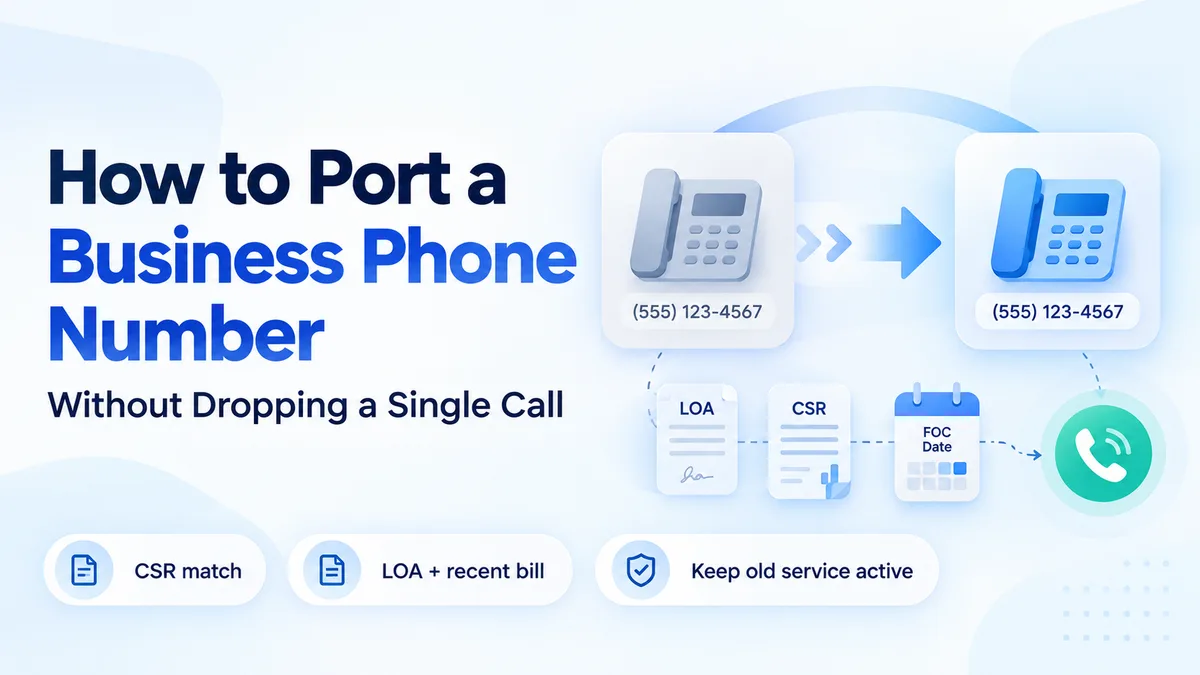
Every port requires a Letter of Authorization (LOA) signed by the authorized signatory on the account. The LOA authorizes the winning carrier to pull the number from the losing carrier.
LOA requires:
- Account number with the losing carrier
- Billing telephone number (BTN): main number on the account
- Service address: matches exactly what’s on file with the losing carrier
- Authorized signatory name: typically the account owner or admin of record
- Signed signature (wet or electronic)
Provide a recent bill (within 30 days) from the losing carrier to verify account details.
This is where most ports get rejected. If your service address on file is “123 Main St” but your LOA says “123 Main Street” or your suite number is missing or your account has an old contact name, the losing carrier rejects the port request. You have to fix and resubmit, losing 3-5 business days.
Fix before starting the port: log in to the losing carrier’s admin portal and confirm:
- Exact service address (including unit/suite)
- Billing telephone number
- Account number (sometimes shown as “BAN”, Billing Account Number)
- Authorized signatory on file
- No outstanding balance or open work orders
Steps in a port
- Request: winning carrier collects the LOA, bill, and number list
- Submit: winning carrier submits FOC (Firm Order Commitment) request to losing carrier via an industry database (NPAC in the US)
- Validation: losing carrier validates LOA against account records. 1-3 business days.
- Acceptance or rejection: if accepted, the losing carrier commits to a port date. If rejected, the winning carrier gets a reason code and you fix and resubmit.
- Port date scheduled: both carriers agree to a specific date and time (usually 4-10 business days after FOC).
- Port executes: at the scheduled time, routing changes. Calls to the number start ringing at the winning carrier.
- Old service deactivates: typically a few hours to a few days after port; confirm with losing carrier.
Common rejection reasons
- Address mismatch: most common
- Account number incorrect: check both BAN and account number variants
- Authorized signatory not on account: LOA signer must match carrier records
- Past-due balance: pay it first
- Active contract with early-termination: port proceeds but you may owe the contract balance
- Unresolved trouble ticket: close open tickets first
- Recent SIM swap fraud alert: carriers sometimes freeze ports for 24-72 hours after account changes
If rejected, the winning carrier passes the reason to you. Fix and resubmit, usually takes another 1-3 business days.
Parallel running: avoiding service interruption
The classic port mistake: cut over on port date, discover something is broken, can’t roll back immediately.
Avoid by running parallel for 30-60 days:
- Keep the losing carrier’s service active with call forwarding to the new number
- Port the number to the new carrier
- New provider answers the call; if anything fails, unport or re-forward
- After 30-60 days of clean operation, cancel the losing carrier
The 30-60 day parallel doubles your phone cost for that window, but eliminates the “something broke, can’t reverse” nightmare. On large deployments, mandatory.
What’s different for toll-free numbers
Toll-free (800, 888, 877, 866, 855, 844, 833) numbers don’t go through the LNP process. They’re managed by a RespOrg (Responsible Organization) in the SMS/800 database.
Process is similar:
- LOA signed by authorized signatory
- Winning RespOrg submits change to SMS/800
- Takes 1-5 business days typically
- Routes change on the agreed date
Most business phone vendors (DialPhone, RingCentral, 8x8) act as RespOrgs and handle this transparently.
What’s different for MS Teams and on-premises PBX
Microsoft Teams numbers can be:
- Microsoft Calling Plans: ported to/from Microsoft following standard LNP
- Operator Connect: number stays with the operator (DialPhone, AT&T, etc.); minimal process on the customer side
- Direct Routing: number stays with your SIP trunking provider; change the SBC config
On-premises PBX (Avaya, Mitel, NEC), numbers typically ride on SIP trunks from a carrier (Verizon, AT&T, Bandwidth, DialPhone SIP). Port the trunks; the PBX keeps running until the customer chooses to replace the PBX itself.
How DialPhone handles porting
On every DialPhone plan:
- Free port-in fee (all plans)
- White-glove migration project manager for teams of 25+ seats
- Dedicated porting ops team handles LOA, bill, address validation
- Parallel-running support included at no charge during cutover
- Typical ports complete in 2-5 business days for US local numbers
- Enterprise batch porting (100-5,000 numbers) handled by Professional Services
See the DialPhone pricing page for plan details.
Checklist before you start a port
- Identify every number to port (main, DIDs, toll-free, fax)
- Confirm exact service address on losing carrier
- Confirm account number and billing telephone number
- Confirm authorized signatory
- Pay any outstanding balance
- Close open trouble tickets
- Collect a recent (within 30 days) bill
- Sign LOA with the winning carrier
- Agree on port date
- Keep losing carrier active for 30-60 days after port
Port Timeline by Number Type
Not all number types port through the same process or on the same timeline. Use this table to set expectations before submitting a request.
| Number type | Process | Typical timeline | Common delays |
|---|---|---|---|
| Local DID (US, single number) | LNP via NPAC | 2–5 business days | Address mismatch on LOA |
| Local DID (block of 10–100 numbers) | LNP bulk port | 5–10 business days | Multiple carrier involvement |
| Toll-free (800, 888, 877, etc.) | RespOrg change via SMS/800 | 3–10 business days | Toll-free not in LNP system |
| Multi-carrier enterprise port | Coordinated LNP | 10–30 business days | Requires project manager |
| International number | Varies by country regulator | 7 days to 12+ weeks | Country-level regulation varies |
| Microsoft Teams (Calling Plan) | Standard LNP to Microsoft | 2–5 business days | Microsoft provisioning queue |
| On-premises PBX SIP trunk | SIP trunk provider port | 5–15 business days | PBX config changes needed |
Top 5 Port Rejection Reasons and How to Fix Each
Port rejections add 3 to 5 business days per rejection cycle. Most rejections are avoidable. Fix these before submitting.
1. Service address mismatch. The address on your LOA does not exactly match what the losing carrier has on file — including suite number, street abbreviation, or city spelling. Fix: log in to the losing carrier’s admin portal, view the exact address on the account, and copy it character-for-character onto the LOA. Do not normalize abbreviations.
2. Account number incorrect. The losing carrier’s account number (also called BAN — Billing Account Number) is sometimes different from your contract reference number or invoice number. Fix: look for “Account number” specifically in the losing carrier’s portal. If you see multiple numbers, call the carrier’s porting department and ask which one to use for LOA purposes.
3. Authorized signatory not on the account. The person signing the LOA must match the authorized contact on the losing carrier’s account record. Fix: log in and check the account profile. If the original signatory left the company, update the account contact before starting the port.
4. Outstanding balance on the account. Most carriers will reject a port request if the account has any past-due balance, even a small one. Fix: pay any outstanding amount and obtain a zero-balance confirmation before submitting the LOA. Some carriers require the payment to post 24 to 48 hours before the port clears.
5. Open trouble ticket on the number. An unresolved service ticket tied to the number being ported will block the port. Fix: contact the losing carrier and confirm no open trouble tickets exist for any number in your port request. Request a ticket-clear confirmation in writing before submitting the LOA.
What to Do If Your Port Is Stuck or Delayed
Even a clean LOA can get stuck. These are the escalation steps in sequence.
Day 0 to 2 after FOC deadline: contact your winning carrier’s porting team. Ask for the specific rejection or delay code from the losing carrier’s response. Every delay has a code. Knowing the code tells you exactly what to fix.
Day 3 to 5: if the winning carrier cannot get a resolution, escalate to their carrier relations or NPAC dispute team. This is a department most SMBs do not know exists. Ask specifically for “carrier escalation” or “NPAC escalation.”
Day 6 and beyond: if the losing carrier is systematically delaying without a valid rejection reason, federal law gives you recourse. FCC rules under the Telecommunications Act prohibit carriers from unreasonably delaying or refusing a valid port. File an informal FCC complaint at fcc.gov/consumers/guides/filing-informal-complaint. Losing carriers respond to FCC complaints within 30 days; escalated porting cases typically resolve within a week of filing.
Port Readiness Checklist
Run through this before submitting any port request to minimize first-submission rejections.
- Collect the exact service address from the losing carrier’s admin portal
- Confirm the billing telephone number (BTN) on the account
- Confirm the account number or BAN exactly as shown in the portal
- Identify the authorized signatory on the losing carrier account
- Pay any outstanding balance — confirm zero-balance status
- Close any open trouble tickets on numbers being ported
- Pull a current bill (within 30 days) from the losing carrier
- List every number being ported — DIDs, toll-free, fax lines
- Sign the LOA with the winning carrier using the authorized signatory’s name
- Confirm the port date with both carriers before the FOC date
- Keep the losing carrier’s service active with call forwarding until 30–60 days after cut-over
Frequently asked questions
How long does business number porting take?
Most US business port requests for local numbers complete in 2 to 5 business days. Toll-free numbers take 3 to 10 business days through a separate RespOrg process. Multi-location or multi-carrier ports run 5 to 15 business days. Enterprise ports of 1,000 or more numbers require dedicated project management and take 10 to 30 business days. The most common cause of delays is incorrect paperwork — specifically, address or account number mismatches on the Letter of Authorization.
What documents are required to port a business phone number?
Every port requires a signed Letter of Authorization (LOA) from the authorized account signatory, the current carrier account number, the billing telephone number, the exact service address as it appears on the carrier account, and a recent bill within the past 30 days. Address mismatches between the LOA and the carrier's records are the leading cause of port rejections. Confirm all details in your current carrier's admin portal before submitting the LOA.
How much does it cost to port a business phone number?
Most winning carriers (DialPhone, Dialpad, RingCentral, Zoom) port numbers for free as a customer acquisition incentive. Losing carriers may charge a port-out fee of $0 to $50 per number, though this is often waived for contracts that are ending. Toll-free RespOrg changes typically cost $10 to $25 per number. If you have a large number inventory, negotiate a porting fee waiver or cap as part of your contract before signing.
Can I keep my phone number when switching VoIP providers?
Yes. Federal regulations under the Telecommunications Act of 1996 guarantee the right to port any US phone number between carriers. Carriers cannot legally block a port, though they can reject a specific port request if the paperwork is incorrect or the account has unresolved issues such as outstanding balances or open trouble tickets. Fix these before initiating the port to avoid delays.
What is parallel running and why does it matter during number porting?
Parallel running means keeping the losing carrier's service active with call forwarding to the new number while the port is in process. This ensures no calls are lost if something goes wrong on the port date. After the port completes and 30 to 60 days of clean operation are confirmed, you cancel the old service. The dual-billing cost during the parallel window is worth it on any deployment larger than a few seats because a failed port mid-testing creates downtime on your main number.
How We Tested
DialPhone re-verifies every comparison in this guide every 90 days. We pull pricing directly from each vendor’s public pricing page on the dates listed in the frontmatter (lastVerifiedAt or updatedAt). Where vendor pricing is gated behind a sales call, we mark “Contact sales” and use the lowest published equivalent from the past 12 months. Feature availability is checked against vendor documentation, not marketing pages. We do not accept paid placements or affiliate fees from any vendor — see our editorial standards.
What We Don’t Like
No platform is perfect, including DialPhone. Honest drawbacks based on user feedback and our own testing:
- Smaller integration catalog than RingCentral (~40 vs 200+). Niche vertical CRM integrations may require API work.
- Newer brand awareness. RingCentral and 8x8 have 15+ years of analyst coverage. Enterprise procurement reviews may take longer.
- Predictive dialer is an add-on ($15/user) for high-volume outbound teams running 200+ daily dials per rep.
- HIPAA BAA starts on Advanced tier ($34/user), not the $24 Core plan. Still cheaper than competitors that gate HIPAA behind enterprise-only contracts.
Related resources
- DialPhone pricing, free number porting on all plans
- Choose a business phone system (8-step guide)
- Number porting glossary
- Start a 14-day trial
Number porting failure is usually caused by paperwork, not the technical port. Fix the address, account number, and signatory up-front and 95% of ports go through clean on the first try.
About the author
Growth Operations Lead at DialPhone
Darshan leads Growth Operations at DialPhone, where he owns three interconnected programs: the comparison content operation, the open VoIP Pricing Dataset, and the test-call methodology used to verify every pricing claim published on the site.
His research process starts with hands-on product trials and live vendor quotes — not marketing pages. Pricing figures are cross-checked against actual invoices and re-verified on a rolling quarterly cycle, with the underlying dataset kept public for independent re-verification. That dataset now covers 40+ VoIP and virtual-number providers across the US and Canada market.
Darshan also leads DialPhone's AI receptionist evaluation program, running structured test-call scenarios across English, Spanish, and French to assess transcription accuracy, intent routing, and escalation behavior. Methodology notes and raw scoring are archived in the research section.
For factual corrections or dataset discrepancies, Darshan can be reached at the DialPhone editorial address. Verified corrections are published as errata with a changelog date — no silent edits.